This AutoSleep review asks whether a paid Apple Watch sleep log is worth a single store bill. This is a source-reviewed guide, not a hands-on lab test. We used Tantsissa’s site, the US and UK App Store pages, the privacy policy, and named reviews captured on 13 September 2026.
AutoSleep reads Health data and estimates time asleep. It can do that if you wear the Watch to bed. It can also guess time in bed if you take the Watch off. That is a different job from a phone alarm that listens to you snore.
Who this AutoSleep review is for
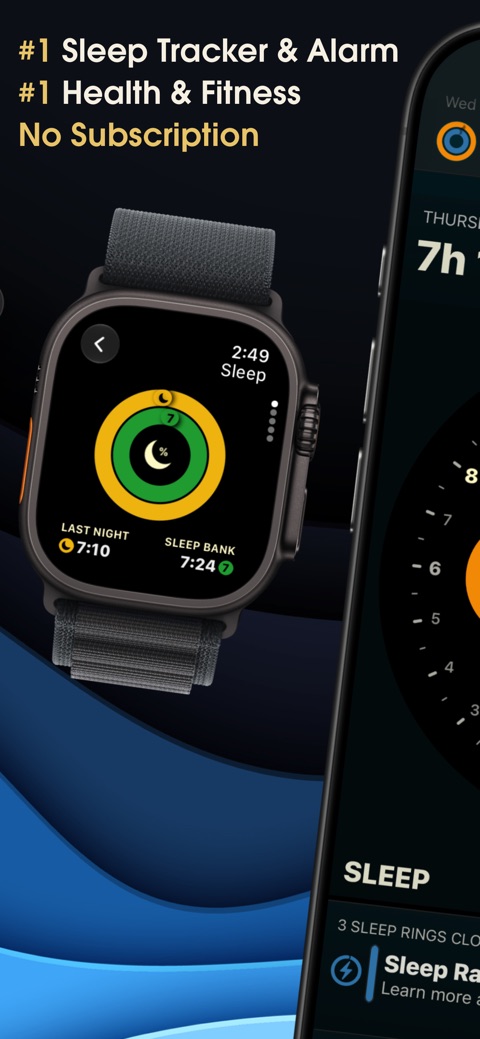
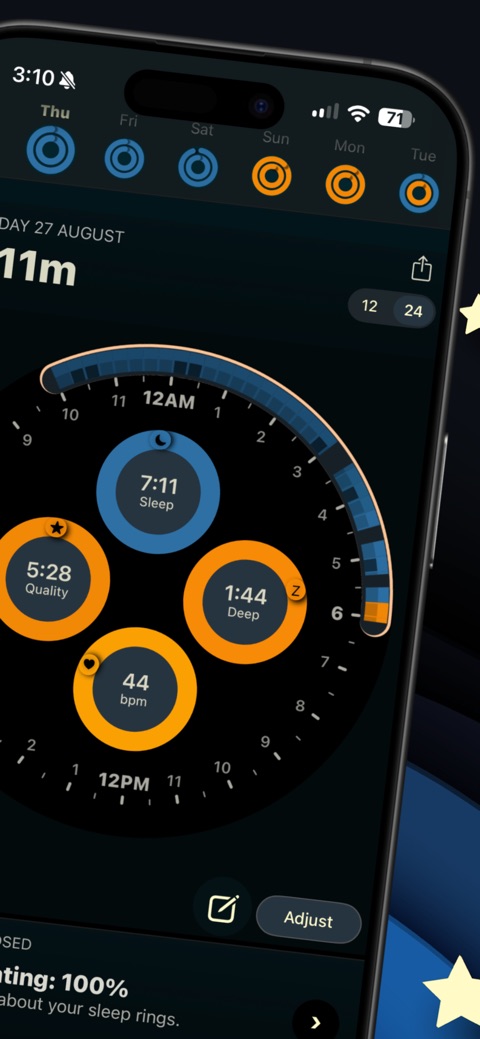
1 of 5
Download AutoSleep: Watch Sleep Tracker on the App Store
This AutoSleep review is for adults who already wear an Apple Watch at night and want a richer log than Apple’s Sleep app rings. It also suits people who hate monthly fees. One bill is the whole commercial story.
Skip it if you only own an Android phone. Skip it if you want snore audio in the same app. Tantsissa now sells a sister app, AutoSnore, as a separate purchase. Skip it if you need a clinician to score sleep apnoea. A consumer gauge is not a lab study.
Compare the wider field on best sleep apps before you add another icon. If you want a phone-only alarm instead, read the Sleep Cycle review. If you want a yearly coach, look at Pillow or SleepWatch.
Dated features and store facts
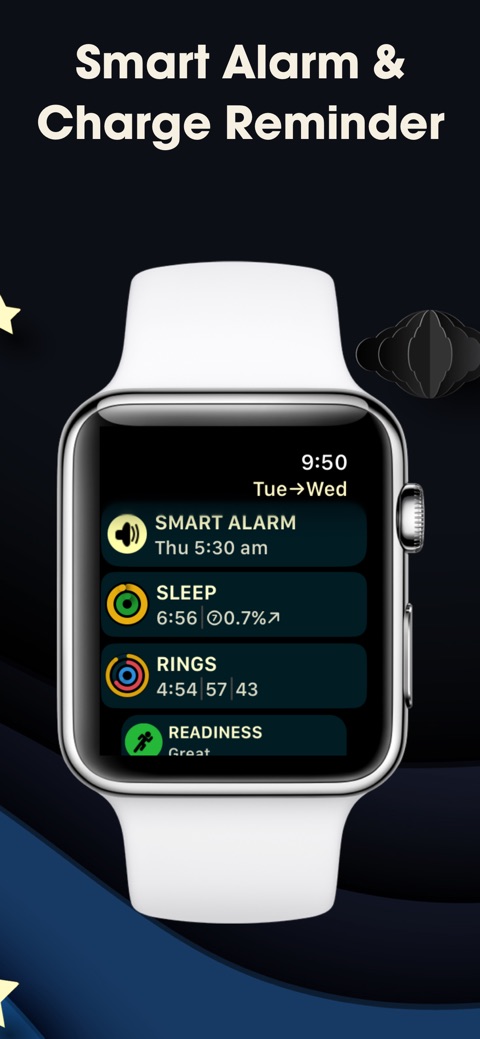
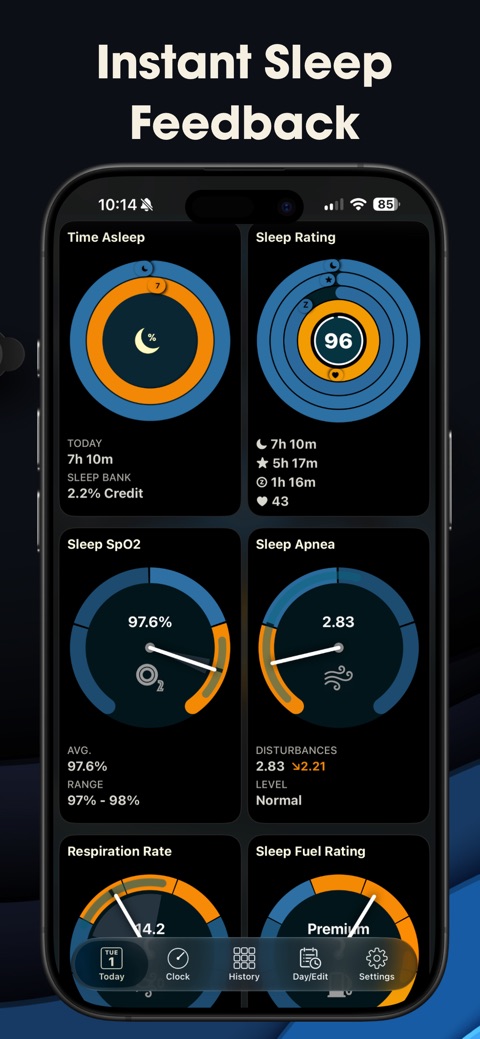
The US listing on 13 September 2026 described automatic Watch tracking, Apple Sleep Stages as an optional mode, sleep rings, a sleep bank, readiness, wrist temperature on supported watches, blood oxygen, respiration rate, widgets, complications, HomeKit, Shortcuts, and CSV-style exports. A smart alarm can sit on the Watch.
The same page listed a sleep apnoea gauge and widgets. That is a visualisation of Health signals. It is not an FDA-cleared diagnostic device. Do not treat a colour bar as a diagnosis.
Version 6.16 (29 November 2025) added AutoSnore integration, iOS 26 “liquid glass” themes, prior-day stress, sleeping HRV on the session graph, and shift-worker hour tweaks. Family Sharing is supported. Up to six family members can use one purchase if Apple’s sharing is on.
| Field | Public listing |
|---|---|
| Current version / update | App Store 6.16, 29 November 2025 |
| Platforms | iPhone (iOS 11+), Apple Watch (watchOS 4+). No Android listing found |
| UK price | £8.99 one-time on the UK App Store |
| US price | $8.99 one-time on the US App Store |
| Free / trial / subscription | Paid download. Listing said no extra in-app purchases and no subscription |
| App Store rating | US: 4.7 from 62,000 ratings, 4+. UK: 4.6 from 5,800 ratings, 4+ |
| Google Play | No official listing found. Omit install bands |
| Privacy / Data Safety | Apple: Data Not Collected. Policy: HealthKit read/write only with permission; no server upload |
| Core features | Auto detect, stages mode, rings, bank, alarm, exports, widgets |
| Validation / sentiment | MacStories 2016 (automatic Watch log). Manufacturer “clinically benchmarked” claim unverified here. Store n dated above |
Pricing: one bill, not a year of fees
Twelve-month cost is $8.99 in the US and £8.99 in the UK if the price you pay matches the listing we fetched. Twenty-four and 36 months stay the same unless you buy AutoSnore later. That is the commercial contrast with almost every rival on this desk.
Do not use third-party “was $4.99” pages. We did not verify older prices. Taxes and storefronts differ. Family Sharing can spread one receipt across a household. That is Apple’s rule, not a Tantsissa discount code.
What published testers actually said
Federico Viticci’s MacStories piece (2016) treated AutoSleep as a way to turn the Watch into an automatic sleep log without installing a Watch app. He wore the Watch for a week and called the log useful. He also said the design had room to grow and that phone-only mode loses the heart-rate story. That is a journalist’s n-of-1 from the first Watch years. It is not a 2026 lab trial.
US App Store reviews we sampled praise automatic capture and exports for clinic conversations. UK reviews mention shift work and sofa naps being logged. Those are user reports, not controlled tests. We do not turn them into a Vitality Ledger score.
CDC adult pages still want at least 7 hours in a 24-hour period for ages 18–60. AutoSleep can show whether you are near that window. It cannot certify that the hours were restorative. See how much sleep by age for the public-health bands, and sleep and weight regulation if hunger after short nights is the next question.
Privacy and on-device data
Tantsissa’s privacy page (fetched 13 September 2026) says AutoSleep has no user analytics, no advertising plugins, no third-party code, and no data upload to any server. HealthKit heart rate, active energy, and sleep analysis stay on the iPhone unless you grant write-back or export a file.
Apple’s label matches that claim: Data Not Collected. That is rare in this category. It is also a developer declaration. We did not audit the binary.
iCloud backups of your phone are still Apple’s cloud. If you turn Health sync on, Apple holds a copy under Apple’s rules. AutoSleep is not responsible for that copy. Read Apple’s Health privacy notes if that matters to you.
Sleep apnoea labels and what remains unverified
The marketing site says AutoSleep is “the only Apple Watch sleep app with custom exports for sleep validation studies” and is “clinically benchmarked.” We did not find a named PubMed paper with sample size and agreement numbers to quote. So we omit a validation figure.
We did not wear a Watch for this AutoSleep review. We did not compare stages with polysomnography. We did not verify the apnoea gauge against a home sleep test.
If you gasp, snore with pauses, or nod off while driving, see a clinician. An app export can support that visit. It cannot replace it.
Who should skip AutoSleep
Skip the purchase if you will not wear the Watch at night. Phone-only time-in-bed is a weaker product. Skip it if you want guided wind-down audio. That is Pillow or Sleep Cycle’s lane.
If you want a subscription coach that talks about sleep debt, wait for the RISE page in this cluster. If you want a free trial first, SleepWatch and Pillow advertise one. AutoSleep does not.
This AutoSleep review’s close: pay once if you already own the Watch and want a local log. Do not pay for a diagnosis.
Frequently asked questions
Is AutoSleep a subscription?
How much is AutoSleep in the UK and the US?
Does AutoSleep work without an Apple Watch?
Can AutoSleep diagnose sleep apnoea?
Is AutoSleep private?
Sources
- 1. AutoSleep: Watch Sleep Tracker
- 2. AutoSleep: Watch Sleep Tracker
- 3. AutoSleep privacy
- 4. AutoSleep
- 5. AutoSleep Turns the Apple Watch Into an Automatic Sleep Tracker
- 6. About Sleep
Guidance changes. Figures were checked against the sources above at the time of review; always confirm current advice with your GP, pharmacist or clinician.
Image credits
- Photo: Apple / App Store (App Store listing)
- Photo: Photo by Pexels contributor on Pexels / Openverse
- Photo: Photo by Takuya Hozumi on Pexels / Openverse
- Photo: Photo by Pixabay on Pexels / Openverse
Was this useful?
Anyone can react — no account needed.

Discussion
0 comments · Name and email only · Email is never shown